

Open your calendar on a Monday morning. Instead of a clear plan, you are greeted by overlapping meetings, fragmented 30-minute gaps, and tasks squeezed wherever space allows. Before real work even begins, you are already negotiating with your schedule.
This experience has become the norm. Modern professionals lose valuable energy to decision fatigue and constant rescheduling. The problem is not a lack of discipline. It is that traditional calendars were never designed for the complexity of today’s work.
That is why smart AI calendar tools are redefining how time is managed.
Unlike static calendars that simply display events, smart AI calendars act as active scheduling systems. They adapt when priorities change, protect focus time, and continuously reorganize your day so you do not have to.
Table of Contents
Why This Guide Matters Now
As we move into 2026, productivity is no longer about squeezing more tasks into the day. It is about reducing cognitive overhead and making better decisions with the time available.
This guide explains the shift from manual scheduling to intelligent time automation. You will learn:
- The mechanics: how smart AI calendar tools work behind the scenes.
- The principles: why AI scheduling needs clear methods to be effective.
- The ecosystem: how different tools illustrate distinct automation philosophies.
- The strategy: how to tailor AI scheduling for freelancers, managers, and remote teams.
By the end, you will understand not only what a smart AI calendar is, but how to use one as part of a sustainable productivity system.
What are smart AI calendar tools?
For decades, digital calendars acted as passive containers. They stored events but offered no guidance. If your day was overbooked, the calendar simply reflected the chaos.
Smart AI calendar tools work differently. They function as decision-support systems. Instead of waiting for manual input, they actively manage time based on priorities, constraints, and real-world behavior.
A traditional calendar answers one question: what is already scheduled? A smart AI calendar answers a more important one: what should happen next?
Think of a standard calendar as a display. A smart AI calendar behaves more like an execution layer. It does not replace your goals, but it helps enforce them when your week becomes unpredictable.
How smart AI calendar tools work behind the scenes

Dynamic rescheduling instead of fixed blocks
Static calendars rely on rigid time blocks. When a meeting runs late, everything else must be adjusted manually. That constant drag-and-drop work is one reason scheduling feels exhausting.
Smart AI calendars introduce dynamic rescheduling. Tasks are treated as flexible components rather than immovable blocks. When priorities shift, the system reorganizes the remaining schedule to preserve what matters most, such as deadlines and focus time.
The intelligence layer: Context, language, and learning
These tools rely on natural language processing to understand simple instructions such as “schedule deep work tomorrow morning.” They also use contextual signals, such as deadlines, meeting load, task duration, and availability rules.
Over time, the system learns patterns: how long certain tasks actually take, when you tend to focus best, and which kinds of work should not be interrupted. The goal is to reduce context switching and protect cognitive energy throughout the day.
Native AI features vs dedicated scheduling systems
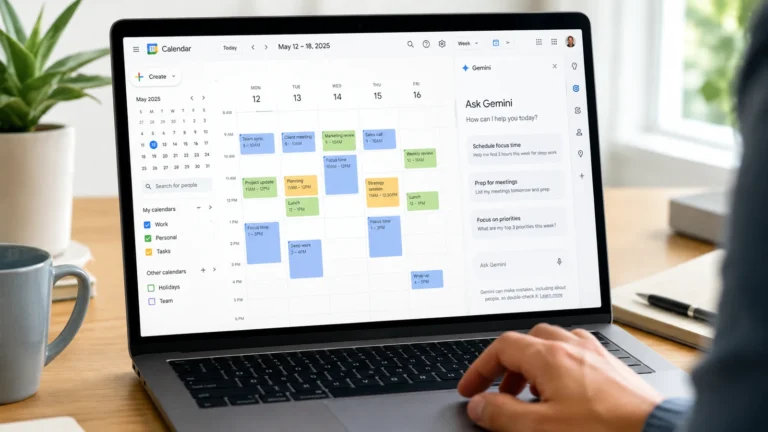
Many traditional calendars now include basic AI features, such as suggested meeting times or simple reminders. These additions can help, but they do not provide full time optimization.
Dedicated smart AI calendar tools are built around automation, prioritization, and adaptation. Their purpose is not to assist planning occasionally, but to operationalize a scheduling system continuously.
For a baseline comparison of what big platforms offer, see our analysis of Google Calendar AI Features.
Why smart AI calendar tools matter in 2026 and Beyond
Work has become more distributed, asynchronous, and interruption-driven. Manual planning struggles under this complexity.
Smart AI calendar tools matter because they remove the cognitive cost of constant coordination. By automating routine trade-offs, they make your schedule more resilient and your focus more protected.
In an environment where attention is scarce, intelligent scheduling is no longer a nice-to-have. It is a practical advantage.
The hidden scheduling problems smart AI calendars solve
Most professionals underestimate how much mental energy is consumed by scheduling. The issue is not visible on the calendar itself, but in the constant background processing required to keep it functional.
Calendar overload
Calendar overload occurs when meetings occupy most available time, leaving little space for execution. Important work gets pushed into evenings or weekends, and stress becomes a default operating mode.
Smart AI calendar tools help by enforcing constraints, limiting meeting density, and defending execution time. Instead of letting meetings expand endlessly, the system protects the blocks where real work happens.
Context switching and cognitive fragmentation
Switching between tasks carries a cognitive cost. A schedule filled with short meetings and small gaps can look manageable on paper, but it can destroy deep focus. Even when total working hours are reasonable, fragmented time makes meaningful work harder to complete.
AI scheduling reduces fragmentation by clustering similar activities and protecting uninterrupted blocks for high-focus work. This is one reason AI calendars can feel like a relief even before they save measurable time.
The planning fallacy
Humans consistently underestimate how long tasks take. This leads to overcommitment, unrealistic daily plans, and a cycle of catching up. The schedule fails not because you lack motivation, but because the plan was never realistic.
Smart AI calendars can learn from behavior. If you routinely need longer than expected for certain tasks, the system adjusts future schedules toward realism rather than optimism.
Decision fatigue
Every rescheduling decision consumes mental energy. By the end of the day, decision quality declines and small changes become disproportionately frustrating.
AI calendars reduce this fatigue by handling routine trade-offs automatically, preserving cognitive capacity for higher-value decisions.
From tools to systems: Productivity principles behind AI scheduling
Installing a powerful tool without a method rarely improves productivity. AI scheduling is most effective when it executes clear principles consistently.
The best results come from combining automation with strategy. The AI handles execution, while you provide the rules that define what a good week looks like.
AI time blocking: Adaptive focus instead of rigid plans
Manual time blocking often fails because it is inflexible. One unexpected event can collapse the entire plan and push users back into reactive mode.
AI time blocking makes blocks adaptive. Instead of fixed slots, tasks are placed dynamically based on priority, estimated effort, and the availability rules you set. When conflicts occur, blocks move automatically without losing their intent. Your schedule stays coherent even when reality changes.
For a full breakdown of this method, see AI Time Blocking Explained.
The perfect week, rules, and task batching
Rule-based scheduling is often more effective than micromanaging every hour. Rather than planning everything manually, you define constraints such as “no meetings before 10 a.m.” or “admin tasks only in the late afternoon.”
Smart AI calendar tools enforce these rules automatically. They also support task batching by grouping similar low-energy tasks into consolidated blocks, reducing mental switching. This prevents the “Swiss cheese schedule” where your day is full of holes that are too small for real work.
To see a practical weekly workflow, read How to Plan Your Week in 10 Minutes with AI.
Key features that define smart AI calendar tools
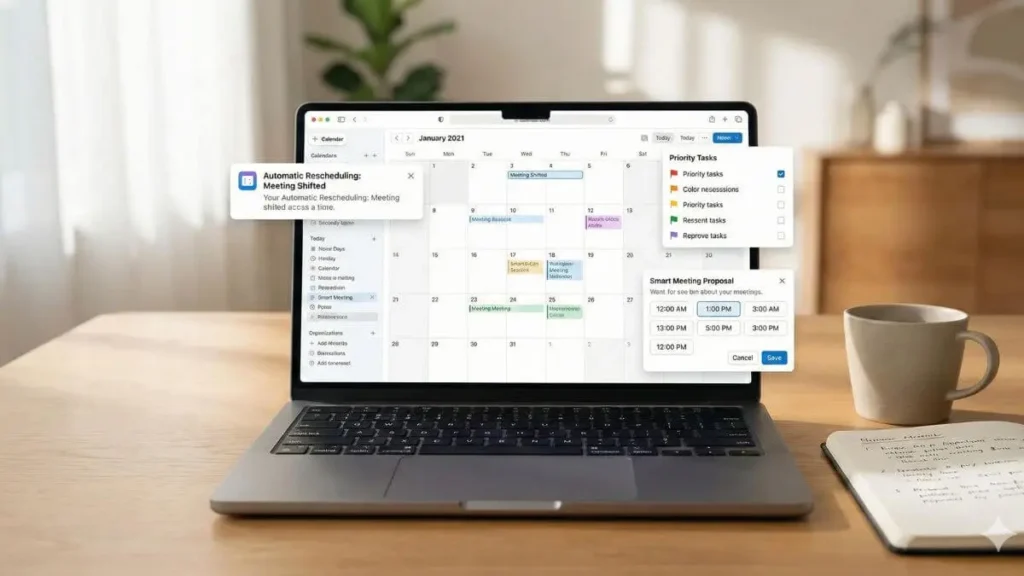
Not every calendar that claims AI is truly a smart scheduling system. What defines smart AI calendar tools is not one feature, but a set of capabilities that work together to optimize time continuously.
Automatic and continuous rescheduling
A smart AI calendar does not just notify you of conflicts. It resolves them by reorganizing the schedule automatically when meetings shift or new priorities appear.
Priority-aware scheduling
Tasks are ranked by importance and urgency so meaningful work is protected while low-priority work remains flexible and movable.
Task and calendar integration
Tasks are scheduled directly into time blocks, creating a single system where time and work are managed together, not in separate silos.
Smart meeting coordination
AI-assisted scheduling reduces back-and-forth by proposing meeting times that respect availability, preferences, time zones, and focus protection rules.
Adaptive learning over time
The system improves as it observes real behavior, making scheduling increasingly personalized, realistic, and aligned with how you actually work.
How to evaluate smart AI calendar tools: A practical framework
Choosing a smart AI calendar tool is not about picking the most popular app. It is about selecting a system that matches how you work, think, and make decisions. Without a clear evaluation framework, users often adopt tools that create more friction than clarity.
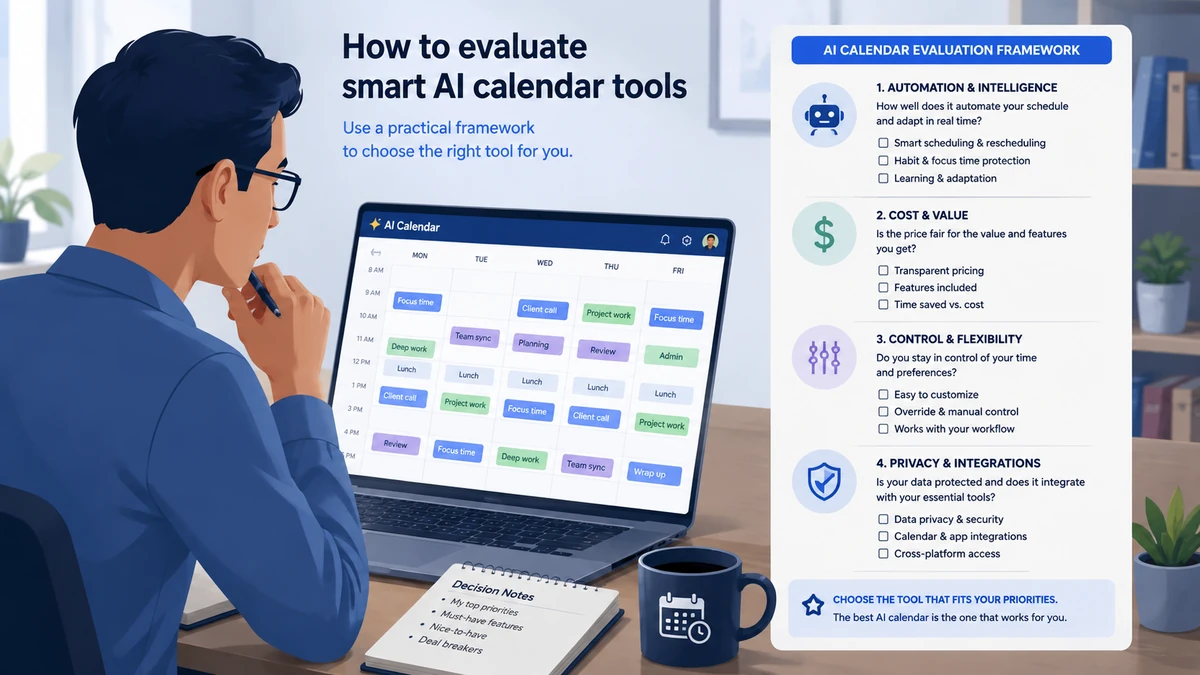
Automation vs control
The first question is how much control you want to delegate.
Some smart AI calendar tools operate with high autonomy. They decide task order, move blocks aggressively, and alert you when your schedule becomes unrealistic. This approach works well for deadline-driven environments, but it can feel restrictive for users who prefer hands-on oversight.
Other tools prioritize guided automation. They suggest changes, protect habits, and adapt without overriding user intent. This model favors flexibility and long-term sustainability.
The right choice depends on whether you want an AI executor or an AI guardian.
Individual vs team optimization
Not all scheduling problems are individual.
If your main challenge is personal focus and task execution, an individual optimization tool may be enough. If your work depends on shared calendars, cross-team availability, or distributed collaboration, team-level optimization becomes important.
Team-oriented AI calendars analyze collective schedules to reduce fragmentation, cluster meetings, and protect shared focus time. Individual tools rarely solve that problem well on their own.
Cognitive load reduction
A core promise of smart AI calendar tools is reduced mental overhead.
When evaluating a tool, notice how often it asks you to make decisions. The best systems minimize prompts and manual adjustments. They remove decisions from your day rather than introducing new ones.
If a tool requires constant fine-tuning to feel stable, it may automate tasks but not attention.
Cost vs value reclaimed
Pricing should be evaluated against cognitive savings, not just features.
A paid AI calendar that reduces weekly planning friction can deliver more value than a free tool that still requires heavy manual work. The best metric is not subscription cost. It is the mental space restored and the consistency gained.
Smart AI calendar tools in practice
After you understand the mechanics and evaluation criteria, it is easier to see how AI scheduling translates into real-world workflows. The goal here is not to rank tools. It is to show different automation philosophies in action.
For a full ranked roundup across more options, see our guide to the Best AI Calendar Tools for Busy Professionals.
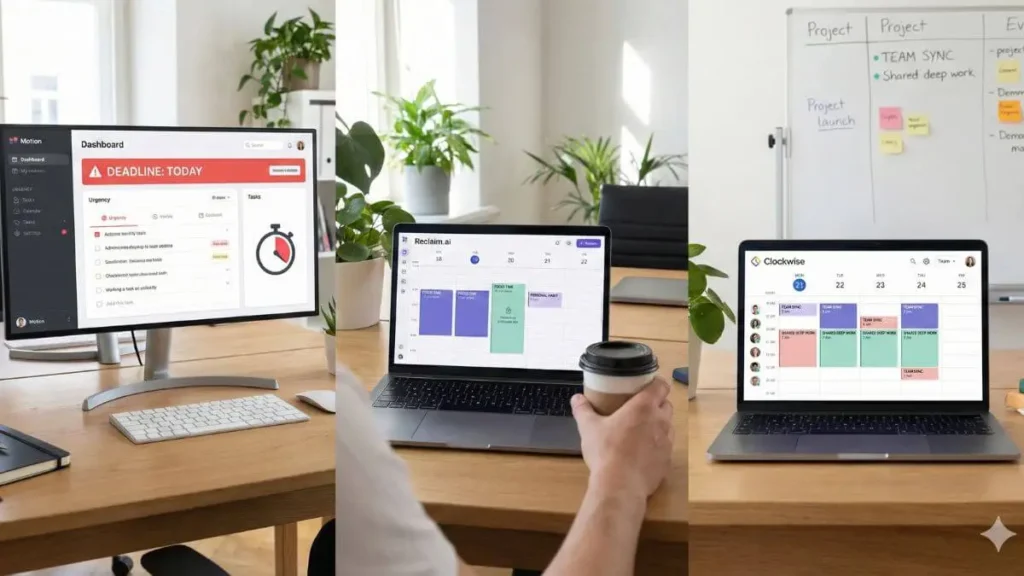
Motion: Deadline-driven scheduling
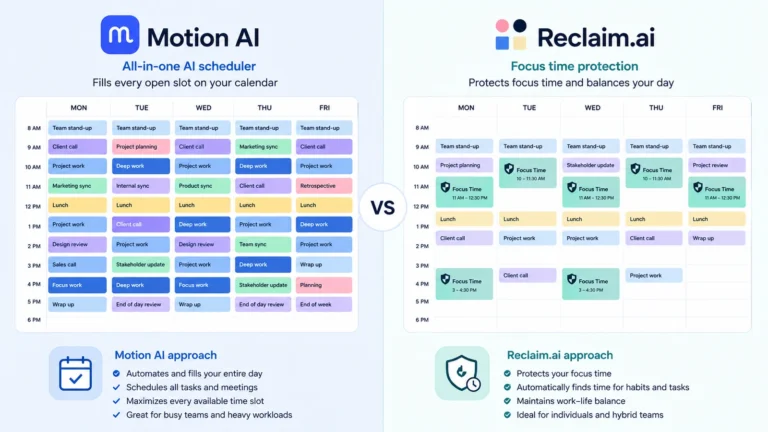
Motion emphasizes execution under constraints. It merges tasks and events into a single system that reorganizes itself around deadlines and urgency. If you are overbooked, it surfaces that reality early, which helps prevent last-minute panic.
This style of automation can be a strong fit for users who want strict prioritization and clear execution order, especially in deadline-heavy environments.
Reclaim.ai: Focus and balance protection
Reclaim.ai approaches scheduling with flexibility and habit protection. It is designed to defend focus time and recurring routines while adapting to shifting meetings. For many users, this model feels more sustainable because it protects boundaries instead of only optimizing for output.
Clockwise and team-oriented tools
Team-focused tools optimize shared schedules to create uninterrupted focus time across organizations. They can cluster flexible meetings and reduce fragmentation so teams get larger blocks for deep work without losing collaboration time.
If you want a direct comparison of two leading philosophies, see Motion AI vs Reclaim.ai: Which Tool Wins?.
Tailoring smart AI calendar tools to your workflow
The same automation rules do not work equally for freelancers, executives, and distributed teams. Smart AI calendar tools deliver the most value when configured around real constraints rather than generic productivity ideals.
For freelancers and solopreneurs
Freelancers face scheduling volatility: client priorities shift, deadlines move, and meetings can expand unpredictably. AI scheduling helps protect delivery time, prevent accidental overbooking, and preserve focus blocks even when your week changes.
For a practical setup, see How Freelancers Use AI Calendars.
For busy professionals and executives
Executives often operate in meeting-heavy environments. Their constraint is not a lack of tasks, but a lack of uninterrupted thinking time. AI scheduling supports this profile by reserving focus blocks, reorganizing meetings around priorities, and reducing decision fatigue caused by constant rescheduling.
For remote teams and managers
Remote and distributed teams add time zones, shared availability, and asynchronous collaboration. AI calendars can help identify better meeting windows, reduce scheduling ping-pong, and preserve collective focus time across teams.
Advanced use cases: Smart AI calendars in real scenarios
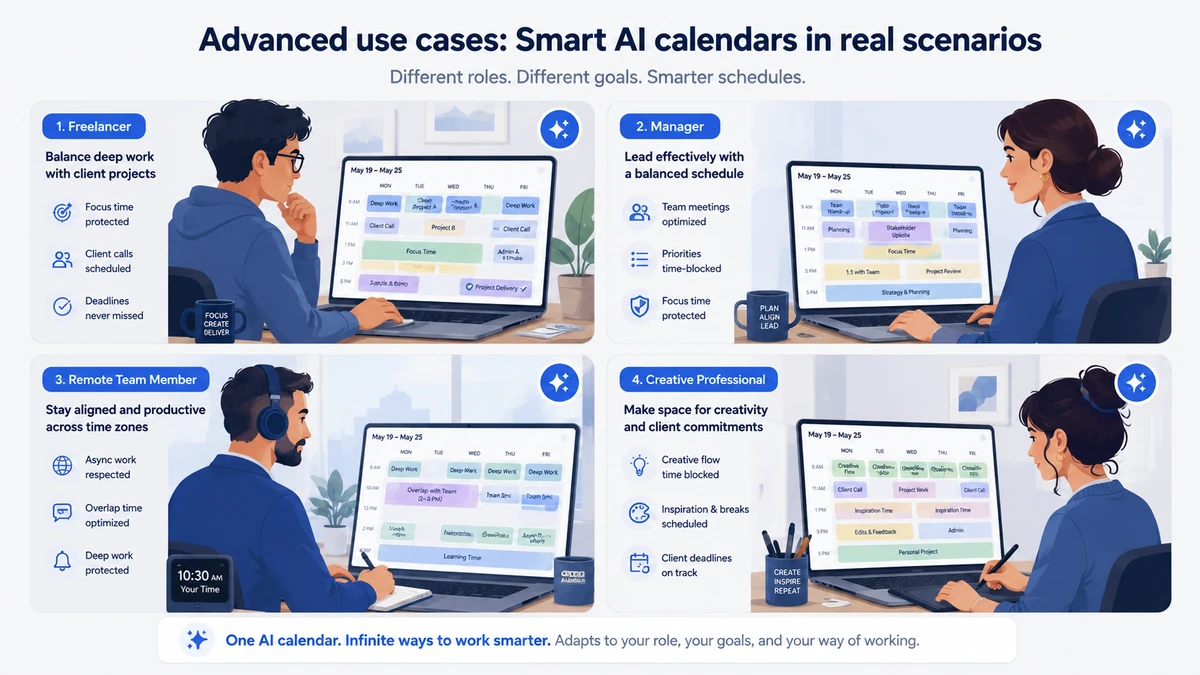
A freelancer managing multiple clients
Without AI scheduling, freelancers constantly renegotiate tasks and meetings. With a smart AI calendar, client calls are constrained, focus blocks are defended, and delivery work is prioritized automatically. The result is fewer interruptions and more predictable output.
A Manager in a Meeting-Heavy Role
Managers often face fragmented calendars filled with short meetings. AI scheduling can cluster meetings, protect strategic thinking time, and reduce the reactive decision-making that comes from constant context switching.
A remote Team across time zones
Distributed teams struggle to find fair meeting times and maintain deep work time. Team-oriented AI calendars optimize shared availability, respect local hours, and reduce coordination friction.
Creative vs operational workdays
Creative work requires long uninterrupted blocks, while operational work tolerates fragmentation. Smart AI calendars can support both by placing creative work in protected windows and batching operational tasks into consolidated blocks.
How to adopt smart AI calendar tools without breaking your workflow
Adoption matters. Even the best AI calendar will feel disappointing if it is deployed without structure. A smooth onboarding process increases trust in automation and reduces the chance you abandon the tool too early.

Common mistakes during adoption
A common mistake is importing a chaotic calendar and expecting the AI to fix everything instantly. AI scheduling amplifies structure. If priorities are missing, the output will remain noisy.
Start with rules not tasks
Begin by defining constraints: focus hours, meeting limits, and your ideal work rhythm. Once the rules are clear, layer tasks gradually. This approach produces cleaner schedules and fewer manual overrides.
Transitioning from traditional calendars
Many users benefit from running AI scheduling alongside their existing calendar during the first one or two weeks. This reduces friction and builds trust while you refine preferences and rules.
When AI scheduling fails
No system is perfect. Failures usually signal missing priorities, unrealistic expectations, or conflicting rules. Adjusting constraints is typically more effective than constant manual overrides. The goal is not perfection. It is a schedule that stays coherent when real life changes.
The future of AI scheduling and time optimization
Smart calendars are evolving from assistants into decision engines. The next generation will move beyond reshuffling time and begin helping users decide what not to schedule.
As AI agents become more common, calendars will serve as coordination hubs that translate intent into optimized schedules across tools, projects, and teams. The long-term value is not only automation. It is clearer allocation of attention.
Smart AI calendar tools: Frequently asked questions
Do smart AI calendar tools really save time?
When configured correctly, they reduce time spent on planning and rescheduling by automating routine decisions and protecting focus blocks.
Are there free smart AI calendar tools?
Some platforms offer limited free plans or basic AI features. Advanced automation, such as continuous rescheduling and deeper integrations, is typically part of paid plans.
Is my data safe with AI scheduling tools?
Reputable tools use strong security practices, but permission levels vary. Always review the access you grant and confirm whether the tool reads only calendar metadata or also analyzes task content.
Can smart AI calendars replace task managers?
They often reduce reliance on task managers by scheduling work directly into time blocks. However, complex project planning may still require dedicated tools, with the calendar used as the execution layer.
Conclusion: Automating Time, Not Just Scheduling It
Traditional calendars reflect schedules. Smart AI calendar tools shape them.
By automating time decisions, these systems reduce mental friction and help professionals focus on what matters most. In 2026 and beyond, intelligent scheduling is not about working more. It is about working with clarity and intention.
If you are ready to choose a solution, start with Motion AI vs Reclaim.ai: Which Tool Wins?. If you prefer to master the method first, begin with AI Time Blocking Explained.