

If your calendar looks like a losing game of Tetris by Wednesday morning, you have probably already searched for a smarter way to plan your week. Motion AI keeps coming up in that search, usually right next to its closest rival, Reclaim.ai.
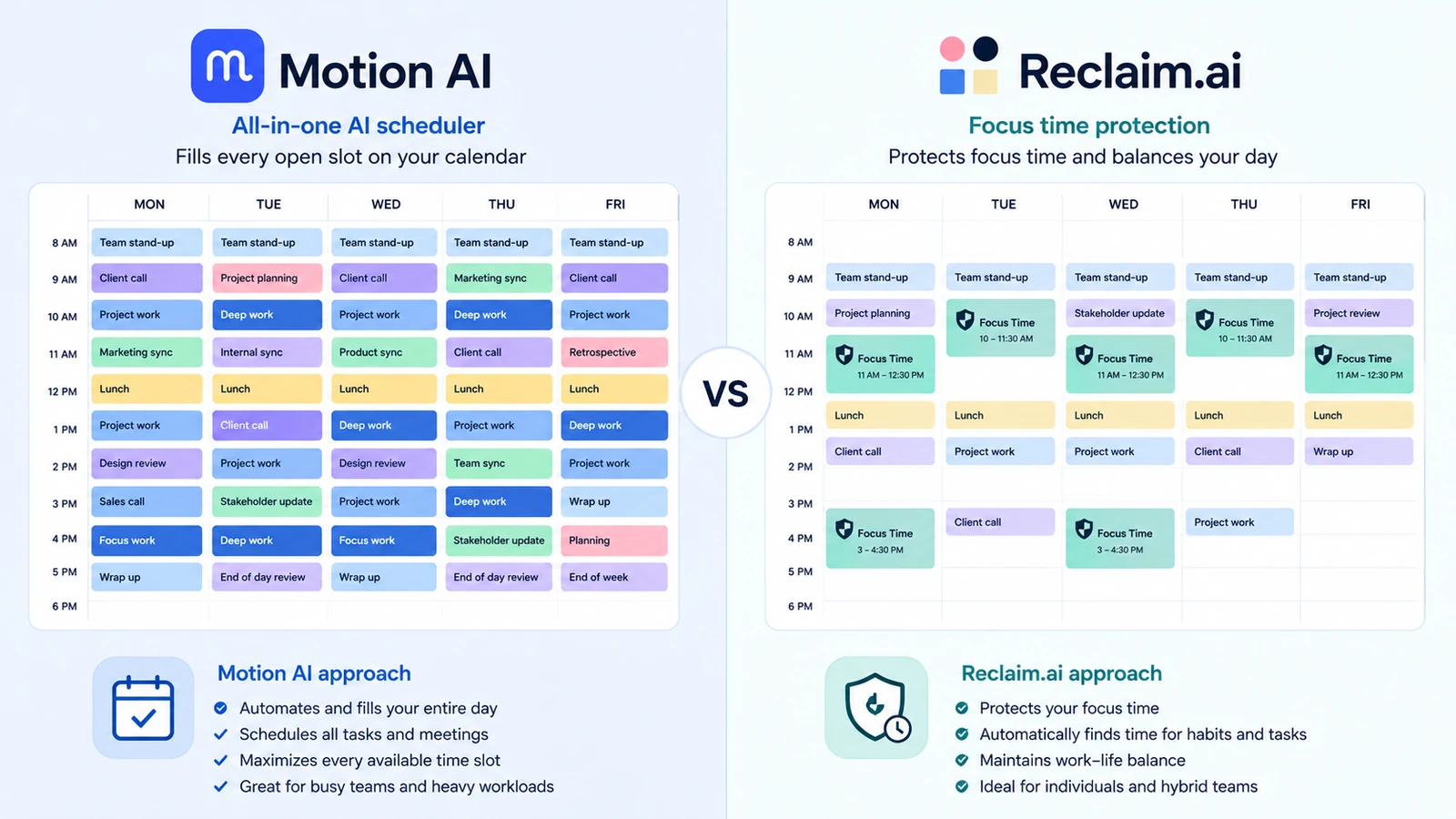
Table of Contents
Both tools promise to take the manual work out of scheduling. But they are not built for the same kind of user, and picking the wrong one means paying for features you will never touch. In this guide, we break down what Motion AI actually does, how it stacks up against Reclaim.ai on price and features, and which one fits a student juggling classes, a solo entrepreneur running a business alone, or a small team trying to stay in sync.
What is Motion AI?
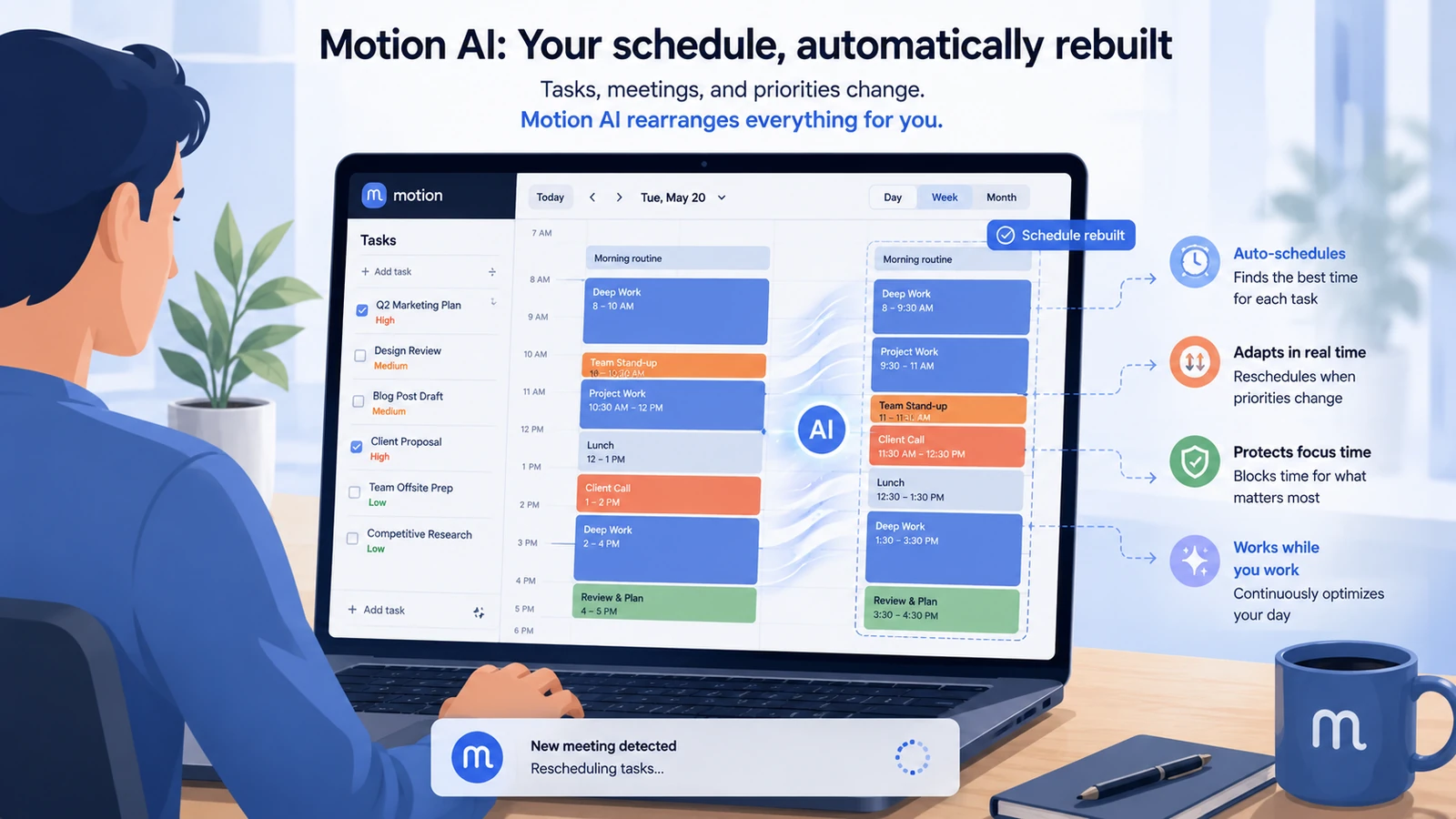
Motion AI is an all-in-one planning tool that merges your calendar, task list, and project management into a single, self-updating schedule. Instead of you manually placing tasks into time slots, Motion’s AI reads your deadlines, priorities, and meetings, then builds and rebuilds your day automatically whenever something changes.
Key features
- AI task scheduling that fills your calendar around existing meetings
- Dynamic rescheduling whenever a task runs long or a meeting gets added
- Built-in project management with timelines and Gantt-style views (Business AI plan)
- Two-way sync with Google Calendar and Outlook
- Team capacity planning and workload visibility (Business AI plan)
Strengths
- Genuinely reduces the daily planning phase, not just the scheduling of meetings
- Combines task management and calendar in one place, so nothing lives in two systems
- Project and team features make it useful beyond solo scheduling
Weaknesses
- No free plan, only a 7-day trial
- No permanent way to try before committing beyond the trial window
- Does not read your inbox or extract tasks from emails
- Can feel like overkill if you only need basic calendar protection
Ease of use
Motion asks for more setup than a simple calendar app. You need to define your priorities, project structures, and working hours before the AI can schedule intelligently. It pays off once configured, but the first week involves a real learning curve.
Best use case
Motion AI fits a freelancer or small business owner who is juggling client projects, deadlines, and meetings at once, and who wants one tool to manage all three instead of switching between a calendar app and a separate to-do list.
What is Reclaim.ai?
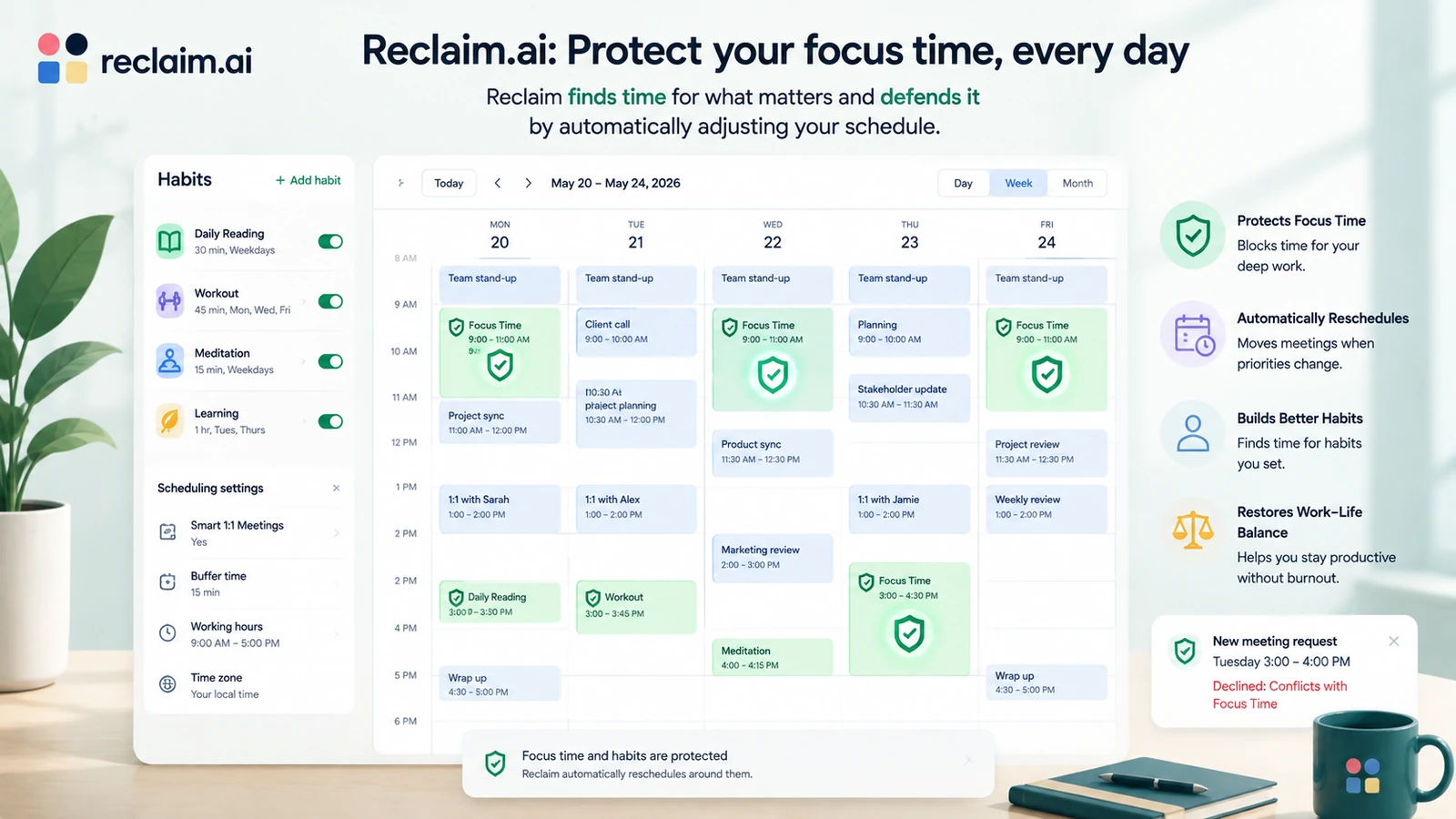
Reclaim.ai takes a narrower, more defensive approach. Rather than managing your entire workload, it focuses on protecting time for the things that matter: recurring habits, focus blocks, and personal commitments, by treating them like flexible events it can move around your fixed meetings.
Key features
- Habit scheduling that automatically finds and protects recurring time blocks
- Smart 1:1 scheduling that finds mutual availability across calendars
- Buffer time between back-to-back meetings
- Scheduling links for booking meetings without the email back-and-forth
- A free Lite plan with basic habit and calendar sync features
Strengths
- Free tier makes it accessible for students or anyone testing AI scheduling for the first time
- Lighter learning curve than Motion, closer to a smart layer on top of Google Calendar
- Strong at protecting personal time like workouts, study blocks, or deep work sessions
Weaknesses
- Not a task manager or project management tool on its own
- Paid tiers scale per seat, which adds up fast for growing teams
- Fewer built-in integrations for complex project workflows
Ease of use
Reclaim.ai is closer to a plug-in for your existing calendar than a new system to learn. Most people set up their first habits and buffers within minutes, which makes it a gentler entry point into AI scheduling.
Best use case
Reclaim.ai fits a student balancing classes, study time, and a part-time job, or anyone who already has a task system they like (including a Notion setup, see how to use Notion AI to organize your projects) and just needs their calendar to defend focus time automatically.
Head-to-head comparison
| Feature | Motion AI | Reclaim.ai |
|---|---|---|
| Core focus | Full task, project, and calendar management | Calendar protection and habit scheduling |
| Free plan | None, 7-day trial only | Yes, Lite plan is free forever |
| Ease of use | Steeper setup, more powerful once configured | Quick setup, lighter feature set |
| Project management | Built in, with Gantt-style views on Business AI | Not included |
| Team features | Capacity planning and workload visibility (Business AI) | Team analytics on Business plan |
| Pricing (2026) | From $19/seat/month | Free, or from $10/seat/month annual |
| Best for | Freelancers and small teams managing full workloads | Students and individuals protecting focus time |
Pricing in 2026
Motion AI has two paid tiers and no free option, according to Motion’s official pricing page. Pro AI costs $19 per seat per month billed monthly, or roughly $12.73 per seat per month billed annually. Business AI, which adds project timelines and team capacity planning, costs $29 per seat per month monthly, or about $19.43 per seat per month annually. Both plans include a monthly pool of AI credits, 7,500 for Pro and 15,000 for Business, with additional usage billed separately.
Reclaim.ai starts with a genuinely free Lite plan that covers one habit, one scheduling link, and basic calendar sync, per Reclaim’s official pricing page. The Starter plan runs $12 per seat per month monthly, or $10 annually, and unlocks unlimited habits and smart meetings. Business costs $18 per seat per month monthly, or $15 annually, and adds team analytics and priority support. Enterprise pricing is custom and only available on annual billing.
💡 Key Insight: If budget is tight, Reclaim.ai’s free tier costs nothing to test, while Motion AI requires a real financial commitment from day one, even at its cheapest tier. The gap narrows on annual billing, but Motion never becomes free.
Who should avoid each tool?
- Motion AI might not be ideal if:
- You are on a tight student budget and want to try AI scheduling for free first
- You only need to protect a few recurring focus blocks, not manage full projects
- Reclaim.ai might not be ideal if:
- You need real project management with tasks, timelines, and team assignments
- You want one single tool instead of pairing a calendar app with a separate task manager
Real-life scenarios
Scenario 1: The Student
Amara is finishing her degree while working a part-time job. She does not have room in her budget for another subscription, so she starts with Reclaim.ai’s free Lite plan to protect her study blocks and keep her part-time shifts from swallowing her evenings.
Scenario 2: The Solo Entrepreneur
Daniel runs a one-person consulting business and juggles client calls, proposals, and deadlines without any support staff. He chooses Motion AI because it replaces three separate tools (calendar, task list, and project tracker) with one system that reorganizes itself every time a client reschedules.
Scenario 3: The Small Team Lead
Priya manages a five-person marketing team and needs visibility into who is overloaded before a deadline hits. She upgrades to Motion AI’s Business plan for the team capacity view, something Reclaim.ai’s calendar-only approach cannot offer.
FAQ
Can I use Motion AI and Reclaim.ai together?
Technically yes, since both sync with Google Calendar, but it rarely makes sense. Both tools try to control your schedule automatically, and running two AI schedulers at once usually creates conflicting suggestions rather than better ones.
Is Motion AI worth the price compared to Reclaim.ai?
It depends on what you need to manage. If you only want your calendar to protect focus time, Reclaim.ai’s free plan already does that. Motion AI is worth its price when you need task and project management built into the same system as your calendar.
Does Reclaim.ai have project management like Motion AI?
No. Reclaim.ai focuses on protecting time on your calendar, not on managing tasks, timelines, or team projects. If project management is what you need, Motion AI is the closer fit.
Which tool is better for students?
Reclaim.ai, mainly because of its free Lite plan. Students rarely need the project management depth Motion AI offers, and a free tool that protects study time is usually enough.
Conclusion
- Choose Motion AI if you are managing real projects, deadlines, and possibly a small team, and you want one tool to handle scheduling and task management together.
- Choose Reclaim.ai if you mainly need your calendar to defend focus time and habits, especially if budget matters and a free plan is a priority.
Both tools are part of a bigger shift toward AI-managed calendars. If you want to see how other AI tools compare before picking your stack, take a look at our breakdown of Jasper AI vs Copy.ai or ChatGPT vs Gemini for daily use.