


The evolution of time management
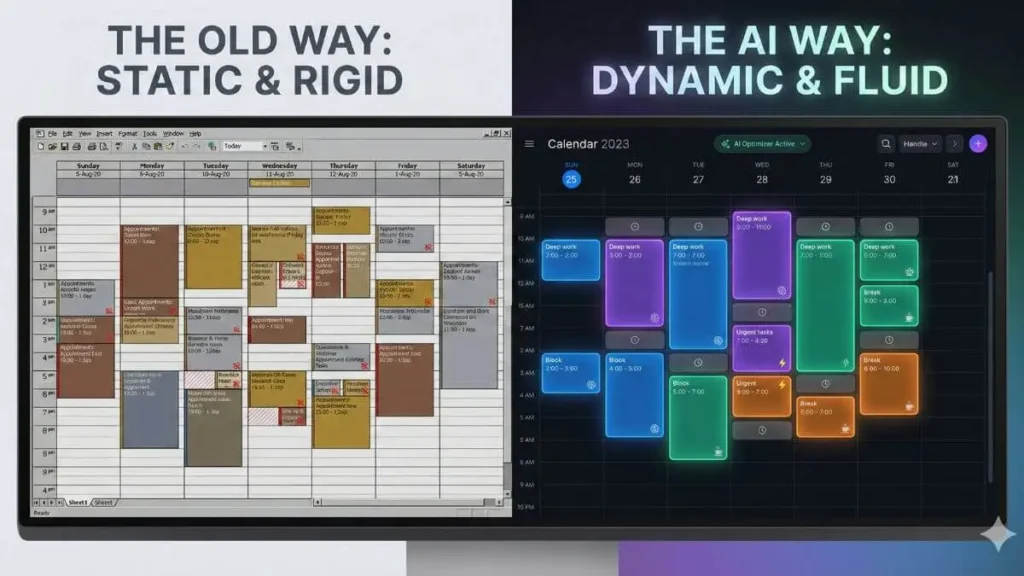
We have all been there. You spend Sunday evening meticulously color-coding your calendar, creating perfect blocks of time for every project. It looks beautiful. It looks productive. Then, Monday morning hits. One urgent email arrives, a meeting runs twenty minutes late, and suddenly, that perfect schedule collapses like a house of cards. This is the failure of the “static calendar” – a rigid system trying to survive in a fluid world.
Enter AI time blocking.
AI time blocking is a productivity method where artificial intelligence dynamically schedules your tasks instead of relying on fixed, manual time slots. Unlike traditional planning systems, it transforms your schedule into a living entity. It is not just a digital diary; it is an intelligent agent that actively negotiates your time for you.
By analyzing your priorities, deadlines, and even your energy levels, these tools construct a schedule that adapts in real time. Most AI time blocking tools operate as intelligent layers on top of existing digital calendars, continuously reshuffling tasks as your day evolves.
In this guide, we will explain exactly how this technology works, why it marks the end of “calendar tetris,” and how it fundamentally differs from the static tools of the past. If you are tired of your calendar being a graveyard of good intentions, you are ready for the dynamic era of 2026.
How AI time blocking actually works
At its core, AI time blocking is not magic; it is a sophisticated logic engine. To understand why it works better than a human brain at scheduling, we need to look at the three-step process these tools use to organize your day.
1. The input: parameters over slots
In a traditional calendar, you place a specific task in a specific slot (e.g., “Write Report” from 2:00 PM to 3:00 PM). With AI, you focus on task attributes instead. You tell the system what needs to be done, how long it takes, its priority level, and the final deadline. You might also tag it as “Deep Work” or “Shallow Work.” You provide the ingredients; the AI acts as the chef.
2. The algorithm: the ultimate Tetris player
Once it has your tasks, the AI scans your existing commitments. It identifies white space that matches the duration and priority of your to-do list. However, it goes deeper than just finding holes. Advanced algorithms consider context switching. They try to cluster similar tasks together to preserve your mental energy, effectively playing a high-speed game of Calendar Tetris to fit everything perfectly without overlapping.
3. The magic: dynamic rescheduling
This is the game-changer. In a manual system, if a meeting runs 15 minutes late, your entire afternoon plan breaks, requiring you to manually shift every subsequent box. With dynamic rescheduling, the AI detects the conflict immediately. It automatically shifts your afternoon tasks, shortens a break, or moves a low-priority item to tomorrow – all without you lifting a finger.
The “layer” concept
It is important to note that you do not usually need to abandon your current tools. Most AI time blocking software functions as an intelligent layer that sits on top of Google Calendar or Outlook. It reads your hard events (meetings), fills the gaps with your flexible work, and writes the results back to your main calendar so your colleagues can see when you are busy.
3 critical benefits over traditional methods
Switching to AI time blocking is not just about having a prettier calendar; it is about fundamentally changing your relationship with work. While manual time blocking is effective in theory, it often fails in practice because it requires high-maintenance administrative work. AI removes that friction, offering three distinct advantages that static calendars simply cannot match.

1. Eliminating decision fatigue
One of the biggest productivity killers is the “what should I do next?” moment. Every time you finish a task and look at a disorganized to-do list, you burn a small amount of mental energy making a choice. By the afternoon, decision fatigue sets in, leading to procrastination. Effective AI time blocking solves this by acting as an executive assistant. It tells you exactly what to work on right now based on your deadlines, saving your brainpower for the actual work.
2. Proactive protection of deep work
A common issue with standard calendars is the “Swiss cheese” effect – where 30-minute meetings are scattered throughout the day, leaving you with no significant blocks of time for focused effort. AI tools prioritize deep work by proactively booking 2-hour focus blocks on your calendar weeks in advance. If a colleague tries to schedule a meeting, the AI defends that time, only offering up your “shallow work” windows or moving the focus block to another viable slot without breaking your flow.
3. Realistic capacity planning
We are all guilty of “optimism bias” – believing we can fit 12 hours of work into an 8-hour day. A paper to-do list never complains when you add one more item, but an AI calendar assistant will. These tools visualize your true capacity. If you try to schedule more tasks than you have hours for, the AI will flag the overcommitment immediately, forcing you to prioritize or push tasks to the next day. This reality check is the single best defense against burnout.
The tool landscape (quick overview)
Now that you understand the “why,” the natural question is “how?” The market for AI time blocking has exploded, but not all algorithms are built with the same philosophy. While many apps claim to organize your life, they generally fall into two distinct categories based on their primary goal.
The “defenders” (balance-first)
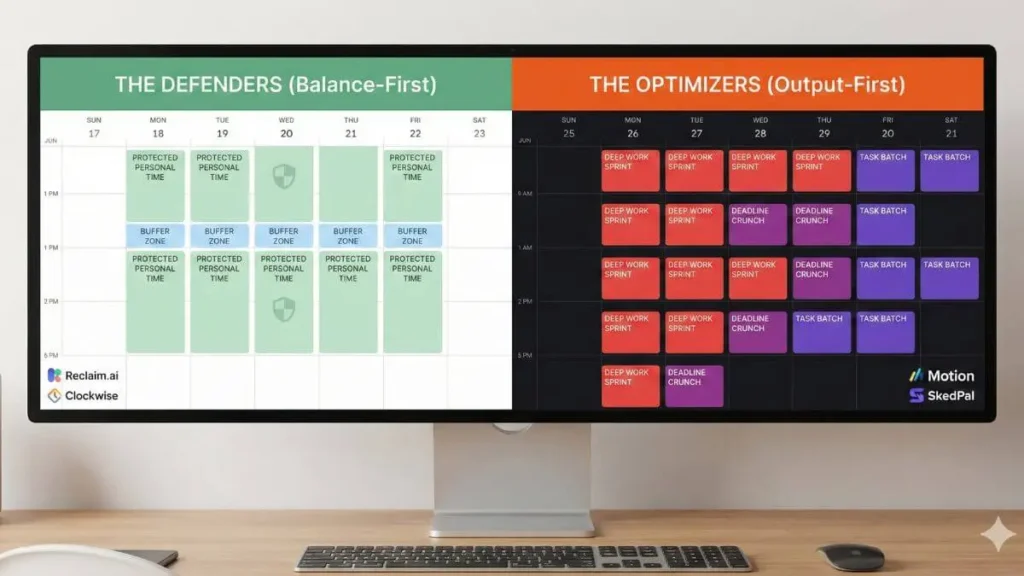
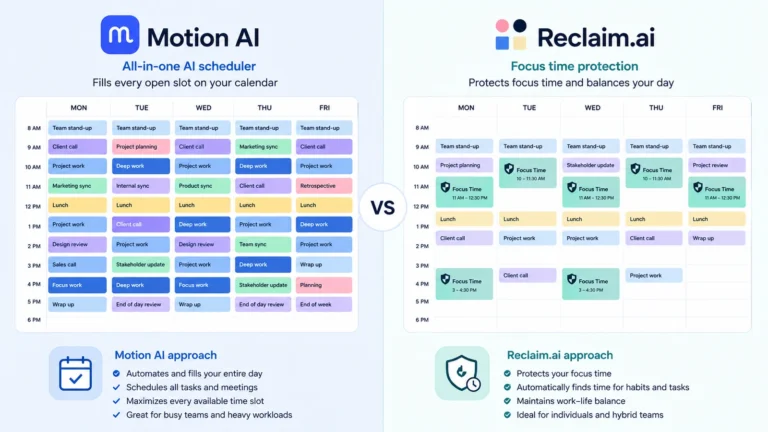
Tools like Reclaim.AI act as defensive linemen for your schedule. Their main priority is to protect your work-life balance and ensure you have breaks. They are excellent for teams who need to synchronize schedules without burnout. They defend your “personal time” just as aggressively as your meeting time. Clockwise used to belong in this same category, but it shut down in March 2026 and folded its users into Reclaim.AI, which is now the main option here.
The “optimizers” (output-first)
On the other end of the spectrum are tools like Motion or SkedPal. These are the aggressive personal trainers of productivity. They treat every minute as a resource to be utilized. If you have a deadline, they will squeeze it into any available gap to ensure completion. These are best for solo operators or executives with high task volume.
The native option: Gemini and Copilot
There is now a third option that does not require installing anything: the AI already built into the calendar you use. Google has been rolling out Gemini directly inside Google Calendar, so it can suggest time blocks or summarize your day from a plain-language request without ever leaving the app. Microsoft is doing the same with Copilot in Outlook, which can read your schedule and draft new events on command. Neither one is as aggressive as a dedicated tool like Motion, but if your calendar already includes it, it is worth testing before you pay for anything separate.
Where to start?
Choosing the right tool depends entirely on whether you need a bodyguard for your free time or a manager for your tasks. We have tested and ranked the top performers in the industry.
For a full breakdown of features, pricing, and pros/cons, read our Smart Calendar Tools Powered by AI: The 2026 Guide.
Best practices for 2026
Adopting AI time blocking is a mindset shift. If you try to use these tools with old habits, you will end up fighting the algorithm. To truly unlock productivity in 2026 without burning out, follow these three golden rules.
1. Don’t target 100% efficiency
Just because the AI can schedule back-to-back tasks for 8 hours doesn’t mean you should do them. Humans are not machines. Always configure your settings to leave “buffer blocks” (10-15 minutes) between deep work sessions. This allows for coffee, bathroom breaks, and the mental reset needed to switch contexts.
2. Batch your “shallow” work
AI excels at finding small gaps in your day. Help it out by grouping small tasks (emails, Slack replies, admin) into a single “Admin Block” or “Shallow Work” task. Instead of scattering these distractions throughout the day, let the AI slot this single 30-minute block into your low-energy window (usually late afternoon).
3. Trust the reschedule
The hardest part is psychological: letting go of control. When the AI moves a task you planned for Tuesday morning to Wednesday afternoon because a meeting ran over, do not manually drag it back unless it is a literal emergency. The system is optimizing for your long-term output, not just your immediate comfort. Trust the logic.
FAQ (people also ask)
What is the difference between time blocking and time boxing?
They sound similar but have different goals. Time blocking is about reserving a specific period for a task (e.g., “I will write from 9 AM to 11 AM”). Time boxing adds a strict deadline to that block (e.g., “I must finish the draft by 11 AM, no matter what”). AI tools primarily use time blocking to organize your day but can enforce time boxing if you set hard deadlines.
Can AI time blocking work with Google Calendar?
Yes. Almost every major AI scheduling tool, including Motion and Reclaim.AI, integrates directly with Google Calendar and Microsoft Outlook. They do not replace your calendar; they enhance it. You continue to use your Google Calendar for viewing, while the AI works in the background to shuffle the events around.
Is AI time blocking worth the money?
If you manage your own schedule or juggle multiple projects, the answer is generally yes. Pricing varies a lot by tool: Reclaim.AI starts free and moves to roughly $12 to $18 per seat for team plans, while a power-user tool like Motion runs closer to $29 to $39 a month for an individual. If the software saves you just two hours of administrative sorting or prevents one missed deadline per month, the ROI is positive. For casual users with simple schedules, the free AI features already built into Google Calendar or Outlook may suffice.
Does AI time blocking replace to-do lists?
Not exactly. It operationalizes them. You still need a place to capture tasks (a to-do list). However, AI time blocking takes those static tasks and gives them a “home” on your calendar. Instead of a list that grows forever, you get a realistic timeline of when those tasks will actually get done.

[…] Most of these tools offer a free trial, so the realistic approach is picking the one that matches your workflow, testing it for a week of real meetings, and switching if it does not click. For a deeper look at how this technology works under the hood, see our guide on AI time blocking explained. […]